Design a study plan learners actually follow
2026-07-07 · The alltutors.ai team

TL;DR
- A study plan has three levels: phases are big stages, units are topics within a stage, and lessons are single sittings a learner finishes in one go.
- You edit the plan by telling the tutor what to change in chat, the way you built it. No forms, no dragging things around.
- Each lesson carries one or more formats: reading, quiz, flashcards, lecture, and infographic are the five you'll use most, and each fits a different kind of content.
- Match format to content, keep lessons short. That's what gets a learner to the end.
What you'll build
A study plan has three levels, and you reshape it by talking to the tutor. That's the whole model. Learn it and you can move a unit, split a topic, or add or swap a lesson's formats in one sentence.
It matters most when a learner has to get through your material on their own. An independent course or tutoring track where students stall halfway. A first-30-days onboarding that right now depends on which manager the new hire happened to get. Structure is what carries them when you're not in the room. No form, no drag-and-drop editor. You say what you want changed, and the plan changes.
Step 1: Understand the three levels
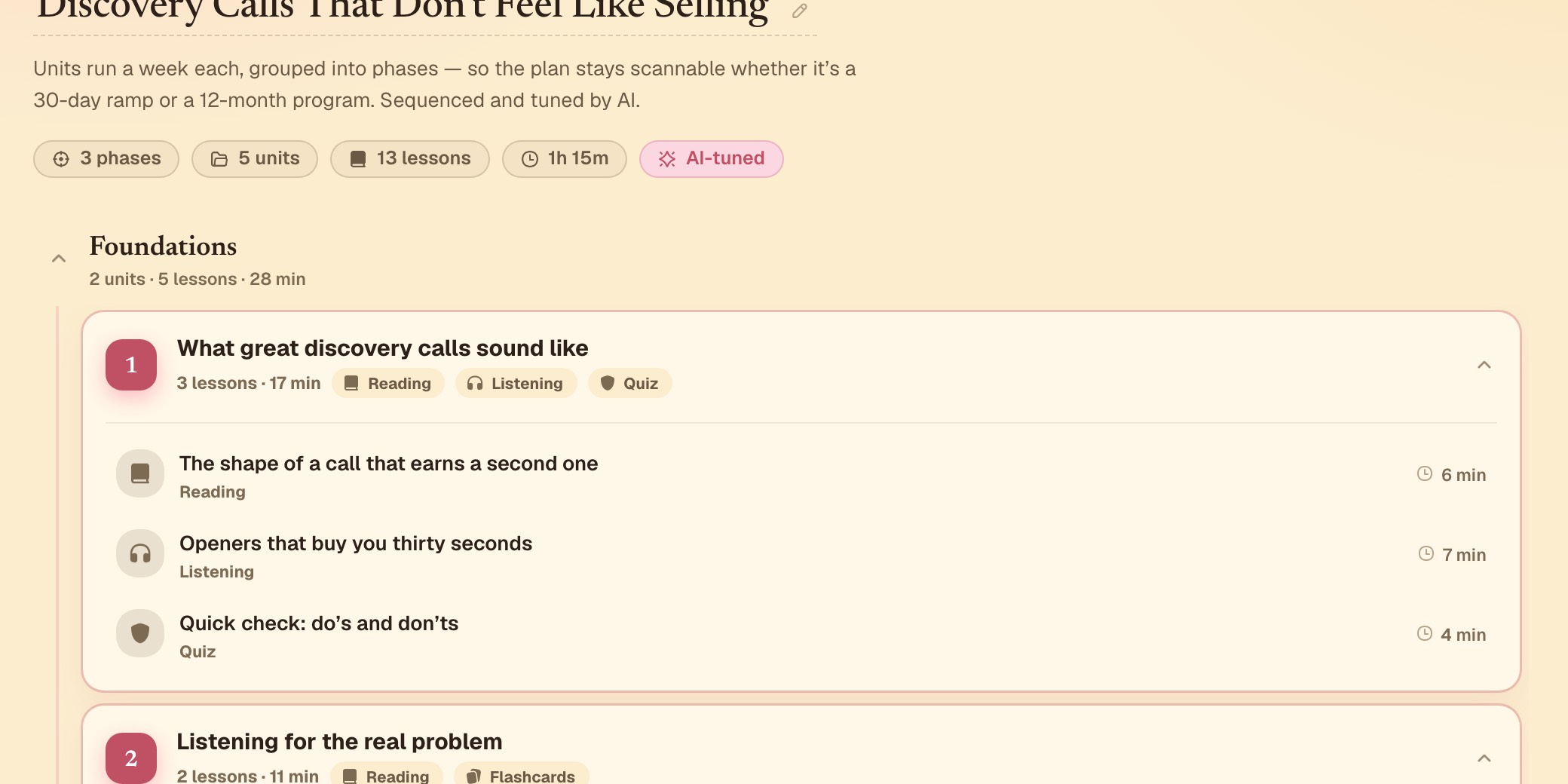
A study plan is a tree, and each level answers a different question.
- Phase: a big stage of the journey. For an exam-prep track that's "Foundations," "Practice," "Exam simulation." For onboarding it's "Week 1: who we are," "Your tools and process," "Ramp to first task." A phase is the top-line stage a learner moves through, the thing you'd list on a syllabus. Every plan has at least one.
- Unit: a topic inside a phase. "Speaking Part 2 structure" or "Where everything lives" are units, not phases. Each one is a single idea a learner can hold in their head at once.
- Lesson: one sitting. What a learner opens, works through, and finishes in a single pass, usually a few minutes. A unit is done when its lessons have taught the topic. There's no target count.
If a unit feels like three topics stapled together, split it into three units. If a phase holds only one unit, it isn't really a stage yet. It's a single topic.
Step 2: Edit the plan by chatting, not by clicking
You restructure the plan by talking to the tutor, the same conversation you built it in. Say what you want in plain language and the plan updates to match:
- "Move the writing unit before speaking."
- "Add a lesson on the Writing Task 2 structure."
- "Add a lesson on the expense policy, right after the tools unit."
- "Split this unit into two, one for speaking and one for listening."
- "Combine units 2 and 3, they're the same topic."
- "Add a new phase for exam simulation, after everything we have now."
The tutor makes the structural change and shows you the result. If it's off, keep talking. "Put that lesson in the first unit instead" works the same as the first request. There's no separate mode to switch into. It's the chat you already know.
Tip: name the position, not just the content. "Add a lesson on the expense policy" leaves the tutor guessing where it goes. "Add a lesson on the expense policy, right after the tools unit" tells it exactly when a new hire should hit that, instead of pinging their manager in week three.
Step 3: Match each lesson to a format
A lesson carries one or more formats. The generator usually assigns a few from the content, a reading followed by a quiz, say, and you can add, swap, or remove them by asking in chat: "turn this into a quiz," "add flashcards after the reading," or "drop the lecture." These five cover most of what a plan needs.
| Format | What it is | Best for |
|---|---|---|
| Reading | A paged story-style reader, the tutor walks through an explanation page by page | Introducing a concept that needs context before it's tested, like the Writing Task 2 rules, or your company values before a new hire touches the tools |
| Quiz | Timed questions across five kinds (multiple-choice, true/false, type-in, order-steps, fill-in-the-blank), with combo scoring and hearts | Checking whether something landed. An IELTS mock section, or the where-things-live check a new hire usually asks a buddy |
| Flashcards | A swipe deck, right to mark "got it," left for "still learning," missed cards get re-queued in the same session | The vocab, formulas, and definitions tutoring students never drill between sessions. The deck re-queues what they miss |
| Lecture | Narrated slide-style beats with a synced transcript, like a short keynote from the tutor | A wrap-up that ties a unit together, or a founder's recorded welcome so remote hires hear a real voice instead of another doc |
| Infographic | A tap-to-explore visual (timelines, process flows, comparisons, hierarchies, stat boards) with a short quiz built in | A structure, sequence, or relationship where the shape of the idea matters as much as the words |
Infographics are also the quickest to generate, since there's no image model in the loop.
Our breakdown of session design goes deeper on pacing lessons so learners come back. And finishing a reading lesson isn't the same as retaining it. Our piece on why completion isn't competence covers that gap, so read it before you lean too hard on any one format.
Step 4: Preview the sequence, not just one lesson
After you reshape the plan and reassign a few formats, walk the whole sequence as a learner would. Don't just reopen the lesson you edited. A plan can read fine unit by unit and still be wrong in order. Two quizzes back to back. Three flashcard decks in a row with nothing to apply in between. Three decks like that is exactly where a paying student closes the tab, or a new hire quietly checks out in week one. Moving through it end to end is the fastest way to catch that before a real learner does.
Tip: if you notice the same format three lessons in a row, that's usually worth breaking up even if each lesson is fine on its own.
What's next
Once the structure feels right, the plan isn't the only thing worth another pass. Our guide on shaping voice and persona covers the other half of what a learner experiences: how the tutor sounds and comes across while it teaches this exact sequence. Or head back to our quickstart guide if you haven't published yet. You don't need a finished plan to publish. A testable one is enough, and you can keep reshaping it by chat after it's live.
Start building and shape the plan as you go.
Frequently asked questions
Do I have to pick a format for every lesson myself?
No. The plan generator assigns a starting format based on the content, and you can change any of them by asking in chat, for example "turn this into flashcards instead."
What happens to a lesson's content if I move it to a different unit?
The lesson keeps its content and its formats. Moving it changes where it sits in the plan, not what's inside it.
Can I add a phase in the middle of a plan I've already confirmed?
Yes. Confirming a plan locks it for publishing, but you can still reopen it and restructure. Confirming just means the tutor won't silently regenerate the plan out from under you.
How many lessons should a unit have?
There's no fixed number. A unit is done when it's taught its one topic. Some take two lessons, some take five. If a unit feels like it's covering three different ideas, that's usually a sign to split it into three units.